
Coursera financial aid may help when a course fits your goals but the fee does not fit your budget. Here’s how to check availability and apply.
You find a course that looks useful, read the syllabus, and start imagining what you could do with the skills. Then you reach the price and close the tab.
Maybe you’re studying on a tight budget. Maybe you’re between jobs. Or perhaps you can cover your everyday expenses, but another learning subscription is difficult to justify.
Before you give up on the course, check whether it offers financial aid. The option can be easy to miss, especially if you’re looking only at the main enrollment button.
This guide explains how to apply for Coursera financial aid, prepare your answers, and avoid mistakes that can disrupt the process. It also covers an important detail that older tutorials often get wrong: approval does not necessarily mean a completely free course.
Application guidance checked against Coursera’s official Help Center on October 18, 2026. Your course page and application offer determine the terms available to you.
Table of Contents
What Coursera Financial Aid Actually Offers
Coursera describes aid as a course discount; the amount can depend on your application and location. Check availability on the specific course page. Coursera financial aid guidance.
That means you should avoid planning around promises such as “every course is free” or “everyone gets the same discount.” Read the offer you actually receive.
For illustration, a 90% discount on a hypothetical $50 fee would leave $5 to pay. That is simply an example of the calculation, not a current Coursera price or a promised aid amount.
It also helps to separate the options you may see:
| Option | What to check before choosing it |
|---|---|
| Financial aid | Whether the course offers it and what your individual offer covers |
| Course preview | Which lessons and assessments are accessible without payment |
| Subscription trial | When billing begins and how to cancel |
| Paid enrollment | The total charge, access period, and certificate requirements |
A free trial is not a financial aid application. If your aim is to apply for aid, follow that route deliberately instead of clicking whichever enrollment button is most prominent.
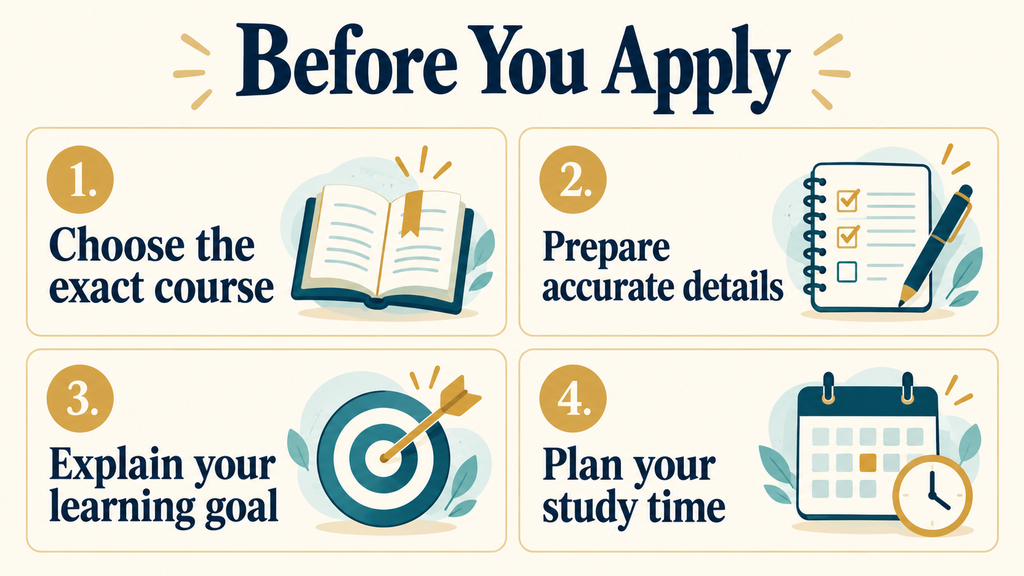
Before You Apply: Prepare These Four Things
1. Choose the exact course
Read the syllabus and prerequisites before spending time on the application. A useful course should match both your goal and your current level.
For example, someone who wants to prepare basic office reports might need spreadsheet formulas and charts before a more advanced analytics course. A familiar provider name is helpful context, but it doesn’t tell you whether the lessons are the right fit.
Save the course title and URL. If it belongs to a larger program, note the individual course name as well.
2. Prepare accurate background information
Have your education, employment, and financial details ready to describe accurately. Read each field carefully rather than assuming every application looks like a tutorial you watched.
If the form asks for income, check the currency and time period. Monthly income and annual income are not interchangeable. Answer the question shown, and don’t invent details to make your circumstances seem more difficult.
3. Identify one useful learning outcome
Complete this sentence: “After this course, I want to be able to…”
You might want to write a basic SQL query, create a spreadsheet report, or organize a small project. A concrete outcome helps you decide whether the course is worth your time and gives your application a clear purpose.
4. Make a realistic study plan
Look at your ordinary week. Could you manage three short sessions, or would one longer weekend session work better?
Leave room for exercises. Watching a lesson and being able to use what it teaches are different things.
Draft your notes in Google Docs, Microsoft Word, or a private notes app. Keeping a copy means you won’t have to start again if the browser closes unexpectedly.
How to Apply for Coursera Financial Aid
Step 1: Open the course description page
Sign in to the Coursera account you plan to study with and open your chosen course. Check its full title before continuing.
If you reached the course through a search result, take a moment to confirm you’re viewing the intended subject and level. Similar course names can make it surprisingly easy to prepare an application for the wrong one.
Step 2: Find the financial aid option
Before enrolling, check the FAQ area. Coursera currently places the aid option under “More questions?” beside the FAQs. Choose Learn more, then Continue to application. Official application steps.
Older screenshots may show a different location. Follow the current page rather than searching indefinitely underneath the enrollment button.
On Windows, press Ctrl + F and search for “financial aid.” On a Mac, use Command + F. On a phone, your browser may offer a “Find in page” option. Smaller screens can stack the FAQ and related information vertically, so scroll through the whole area.
Step 3: Read the form and complete your details
Read the questions once before answering. Notice required fields, instructions, and any word counters.
Coursera specifies a 150-word minimum for the application; follow the instructions attached to each field in your form. Application requirements.
Don’t assume you must write exactly two essays because an older guide says so. Use the questions currently presented to you.
If your answer needs more detail, explain something relevant: your present situation, why the cost is difficult, the skills you need, or how you intend to practice. Repeating a sentence to reach a word count does not make your explanation clearer.
Step 4: Explain your financial circumstances and goal
Keep the language straightforward. You don’t need to sound like a scholarship brochure.
Describe your real situation, explain the budget constraint, and connect the course to a practical goal. If you have some income but limited money available for education, say that accurately. Don’t describe yourself as having no income simply because it sounds more persuasive.
Use the syllabus to make the learning goal specific. “I want to learn formulas and charts so I can prepare a monthly sales report” explains more than “I want to become successful.”
The next section gives a structure you can adapt without copying someone else’s circumstances.
Step 5: Review and submit
Check the course name, financial figures, spelling, and completeness of your answers. Read the commitments presented with the application before accepting them.
Save your final answers privately, submit the form, and keep the confirmation date. A screenshot or a short note is enough.
Avoid including unnecessary sensitive details in your writing. Explain the circumstances requested by the form without adding bank passwords, card details, or unrelated identification information to an essay.
Step 6: Wait without starting a subscription trial
Review can take up to 16 days. Coursera warns that starting a subscription free trial during review cancels the application. Review and trial rules.
This is worth remembering when you return to the course and see an invitation to start learning immediately. Pause before choosing a trial.
Use the waiting period to review prerequisites, prepare a study folder, or practice with resources you can already access. If a preview is available, check what it includes before relying on it.
Coursera’s current enrollment guidance describes first-module previews for many courses. Don’t assume that the entire course can be audited free just because an older article says so. Coursera enrollment options.
Step 7: Read the decision and enrollment instructions
Check your email and Coursera Updates. If approved, follow the instructions and review any remaining charge. Coursera specifies 180 days after enrollment to complete the course with aid. Approval and access guidance.
Keep the approval message. Confirm that the offer names the right course, and check that any remaining payment fits your budget before proceeding.
Then schedule the first study session. An application can feel like progress, but the useful part starts when you begin practicing.
What to Write: A Practical Example
Here is a hypothetical situation, not a testimonial or a ready-to-submit answer.
A learner helps a small shop maintain sales records. They can enter numbers in a spreadsheet but struggle with formulas and summaries. Their budget covers essential expenses, with little available for training. They want to learn how to turn those records into a monthly report.
Their notes could look like this:
| Part of the answer | Details to explain |
|---|---|
| Current situation | Helping with shop records and learning alongside other responsibilities |
| Financial constraint | Why the course fee is difficult within their actual budget |
| Skill gap | Formulas, data organization, and simple charts |
| Course connection | The specific lessons that cover those skills |
| Practice plan | Build a sample report using fictional sales data |
| Study schedule | A manageable number of sessions each week |
The value is in the connection between the details. The learner has a task, a skill gap, and a reason for choosing that course.
Your circumstances may be entirely different. You might be a student, a career changer, or someone learning for a personal project. Use your own facts.
There is no special phrase that guarantees approval. Clear writing helps communicate your situation; it cannot promise the decision.
If you use a grammar checker or AI assistant, ask it to improve your own draft without adding facts. Review every sentence afterward. An impressive-sounding answer is not helpful if it claims experience, income, or plans you don’t have.
What If the Financial Aid Link Is Missing?
First, confirm that you’re on the individual course description page. Then inspect the FAQ area and use your browser’s search feature.
If you’re using the mobile app, try the website in an updated browser. This is a troubleshooting step, not a way to make an unavailable offer appear.
If you still cannot find it, ask the Coursera Learner Help Center about that exact course. Include its title, URL, and a brief description of what you see.
Don’t change your country or create accounts to chase a different offer. Work with the terms available to you and ask for clarification when needed.
Does One Application Cover a Whole Program?
For Specializations, applications are separate for each course. Aid cannot be transferred between courses. Coursera’s coverage rules.
Keep track of the course named in your approval instead of assuming it unlocks every course displayed on the program page.
For a longer learning path, make a simple list of what you plan to study next. Check availability and terms as you progress. Avoid building your entire budget around future aid that has not been offered.
Common Mistakes to Avoid
Believing that approval always means zero cost
Read the actual offer before making a payment decision. A discount can be useful and still leave an amount you cannot currently afford.
Copying an application that describes someone else
Sample answers can help you understand structure. They cannot supply your education, circumstances, or goals. Check that every detail in your answer is true for you.
Choosing a course only because aid is available
Your time matters too. A course that is too advanced, unrelated to your needs, or difficult to practice may be a poor fit even at a reduced price.
Planning around an instant decision
Leave room for review. Don’t promise a completed certificate to an employer or client based on an application that is still pending.
Collecting approvals without a study schedule
Start with a course you can realistically work through. Three steady study sessions are more useful than a long list of courses you intend to begin “soon.”
If Your Application Is Denied
Read the reason in the decision email. Coursera allows another application when an application issue needs correcting. Denied application guidance.
Fix the specific problem rather than rewriting your circumstances to sound more dramatic. If you don’t understand the decision, ask support for clarification.
You can also check whether your school or employer provides access to learning resources. Ask what is actually included before assuming it covers your chosen course.
If your main goal is the skill, consider other resources while you decide. The right question is whether you can learn and practice what you need, not whether you can collect this particular credential immediately. Our guide to whether online course certificates are worth it can help you weigh that decision.
Frequently Asked Questions
Is Coursera financial aid guaranteed?
No. Treat submitting an application as a request, not an approval. Neither a template nor a paid application-writing service can promise the result.
Should I copy an answer from another website?
Use examples to understand what makes an explanation clear. Write the actual answer from your own circumstances and check it against the question on the form.
What if I have a job but the course is still difficult to afford?
Describe your employment and budget accurately. Don’t assume that having a job means you should hide your situation, and don’t assume it guarantees eligibility. Let the application process assess your circumstances.
Will financial aid make the course easier to pass?
Plan to do the learning and meet the course requirements. The point of applying is to make access more affordable, not to replace the exercises or assessments.
Choose One Course and Give It a Real Plan
Start with a course that teaches something you can use. Check the aid option, prepare accurate answers, and read the decision carefully.
Before submitting, return to that sentence: “After this course, I want to be able to…”
If you can finish it with a clear task and make time to practice, you have a reason to move forward. Keep that goal beside your study notes. It will be more useful during a difficult lesson than the excitement of receiving an approval email.