

You ask an AI chatbot to write a quick email. It gives you six paragraphs, three unnecessary apologies, and an opening that sounds nothing like you.
By the time you finish editing, writing it yourself starts to look like the faster option.
That frustration is the starting point for this Google AI Essentials review. Plenty of people have tried AI. Fewer have figured out how to make it consistently useful for ordinary work.
The course promises an introduction to those everyday skills. But is that introduction worth paying for when free AI tutorials are everywhere?
After reviewing Google’s curriculum and Coursera’s listing, my view is that it makes sense for beginners who want structure and practical exercises. Experienced users should look closely at the syllabus before spending money.
For transparency, this is a research-based review, not a claim that I completed the paid course. The examples below are original practice scenarios. Course details and pricing were checked on October 17, 2026.
Table of Contents
What Is Google AI Essentials?
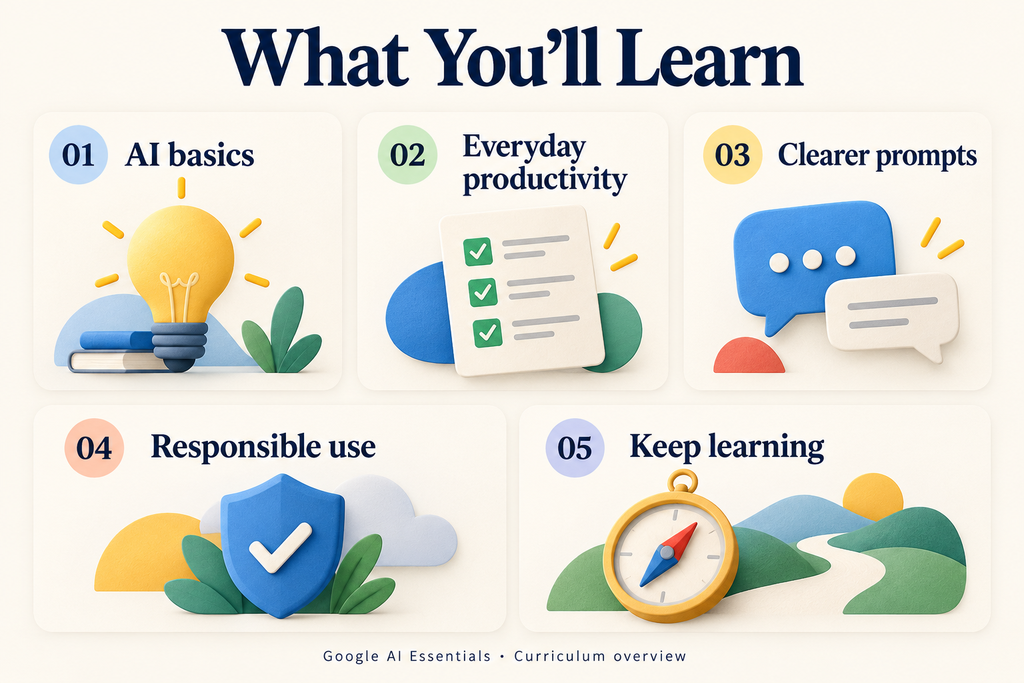
Google AI Essentials is a self-paced online program developed by Google and delivered through Coursera. It welcomes beginners and focuses on using generative AI for everyday tasks. Google describes five learning areas covering fundamentals, productivity, prompting, responsible use, and continued learning. Google AI Essentials
Think about the work that tends to pile up: turning notes into an update, getting an outline started, or writing the same type of reply repeatedly. Those are useful starting points for deciding whether the program fits your needs.
You don’t need an ambitious plan to “master AI.” Having one recurring task you would like to handle better is enough to begin.
What You Learn in Google AI Essentials
Coursera currently packages the program as five courses. Its syllabus includes understanding AI’s limitations, choosing appropriate tasks, creating specific prompts, recognizing privacy and bias risks, and evaluating new tools. Coursera curriculum
Here’s what those topics mean in practical terms:
- Introduction to AI: Build enough understanding to recognize where an AI tool might help and where its answers need scrutiny.
- Maximize Productivity With AI Tools: Look at your work and identify suitable opportunities for assistance.
- Discover the Art of Prompting: Learn to explain what you want clearly.
- Use AI Responsibly: Consider accuracy, privacy, bias, and the consequences of using an answer.
- Stay Ahead of the AI Curve: Develop a way to assess new tools without chasing every release.
The prompting section is probably the easiest part for a beginner to connect with immediately. You can change an instruction and compare the results within minutes.
However, choosing the right task matters just as much.
Suppose you have rough meeting notes. Asking AI to organize them into decisions, open questions, and next steps gives it a defined job.
Asking it to decide what everyone agreed to when your notes are incomplete creates a different problem. A tidy summary can conceal missing information.
That distinction is worth learning early: an answer can look finished before it is trustworthy.
A Practical Prompting Example
Consider this original email exercise. You could try it in Gemini or another conversational AI tool.
Start with:
Write an email to my client about a delay.
There is very little for the tool to work with. It doesn’t know what is delayed, why it happened, or what you have agreed to offer.
Now try:
Draft an email under 120 words to a website client. Their preview will be ready Thursday instead of Tuesday because mobile testing needs two more days. Use a friendly, accountable tone. Explain the delay briefly and ask whether Thursday afternoon works for their review. Don’t invent reasons, offer compensation, or make additional promises.

The second prompt supplies facts and boundaries. It also gives you a standard for reviewing the answer.
Did the draft include the revised date? Did it invent a technical problem? Did it promise that the entire website would launch Thursday when you only mentioned a preview?
This is a more useful practice habit than searching for a single “perfect prompt.”
If the result is awkward, revise one thing at a time. “Make it better” is vague. “Remove the formal opening and shorten the explanation to one sentence” gives a clear direction.
Keep the versions in a Google Doc with a brief note about what changed. That small collection can become a practical reference for future work.
How Much Does Google AI Essentials Cost?
Google lists a subscription price of US$49 per month in the United States and Canada after an initial seven-day free trial. Other countries may have different prices, so the enrollment screen is the place to confirm your local offer. Google pricing information
At that rate, one paid month costs $49 and two paid months cost $98, before any applicable taxes or checkout differences.
The risk is simple: signing up when you have no time to study. You can end up paying another month for a course that has barely moved beyond your browser bookmarks.
Before enrolling, check:
- Which subscription or offer you are selecting.
- The amount you will pay and the next billing date.
- The trial, cancellation, and certificate conditions.
- Whether financial assistance is available for your enrollment.
- Whether you have time for both the lessons and practice.
Don’t treat “Enroll for free” as a guarantee of a free certificate. Coursera describes paid access, and assistance options depend on availability and eligibility. Coursera enrollment details
I also wouldn’t build a plan around finishing during the trial without first reading the conditions shown to you. A trial is an opportunity to assess the experience; the checkout terms determine what happens afterward.
How Long Does the Course Take?
The official pages give slightly different estimates. Google’s main page says under five hours. Coursera’s headline says four hours, while its longer description says under ten. Google course overview, Coursera program overview
I would leave room for several short sessions rather than planning around the shortest advertised figure.
Watching a lesson and applying it are separate activities. If you stop to test prompts, compare answers, and investigate mistakes, your learning time will naturally increase.
How to Get More Value From the Course
A useful routine is to pair each study session with one small exercise. Start with fictional or non-sensitive material so you can experiment freely.
For example, imagine you manage a small online shop and want help drafting customer replies. Here’s a simple practice exercise:
- Create a fictional policy sheet. Include delivery estimates, return conditions, and product-care instructions.
- Write three customer questions. Make sure one asks about something the policy does not explain.
- Request draft replies. Ask the chatbot to use only the supplied information and flag anything missing.
- Check each response. Compare every promise and policy detail against your original sheet.
- Revise and repeat. Adjust unclear instructions and see whether the next version improves.
Did an estimated delivery date become a guarantee? Did the tool invent an exception to the return policy? Did it confidently answer the question your policy never addressed?
The useful result might be a request for clarification. That can feel less impressive than a polished response, but it prevents you from sending a promise you cannot keep.
This exercise also reveals something easy to overlook: sometimes the source material needs improving. Better instructions cannot supply a business policy you haven’t decided on.
Who Is Google AI Essentials For?
For office workers new to AI, this kind of practice is a good reason to consider the program. Emails, agendas, notes, and draft updates provide manageable opportunities to learn.
Freelancers can also bring specific tasks to it. A designer might turn a project brief into clarification questions. A writer might compare possible outlines based on verified research. An assistant might organize a meeting agenda from supplied priorities.
Small-business owners could practice drafting customer messages or planning content, while keeping control over prices, promises, and final decisions.
Students may find value in generating practice questions or asking for alternative explanations, provided they follow their institution’s rules and check answers against reliable material.
The common thread is having work you can evaluate. You should be able to explain what a useful answer looks like before deciding that AI produced one.
Is the Google AI Essentials Certificate Useful?
Coursera says completing the program earns a shareable Google certificate. Certificate information
I would treat that as supporting evidence of learning. Pair it with a small example that demonstrates your judgment: the original task, your instructions, the draft, and the corrections you made.
For job seekers, that example gives you something concrete to discuss. You can explain the problem, show your approach, and describe how you checked the result.
Being able to explain why you rejected part of an AI answer may tell someone more about your ability than displaying the finished output alone.
Who Might Want to Skip It?
If you already create detailed prompts, check outputs carefully, and use AI regularly for well-defined tasks, the introductory scope may feel familiar.
If your goal is technical work such as building and deploying machine-learning systems, compare the published curriculum with that requirement. This program’s emphasis is everyday use.
And if money is tight, don’t feel pressured to buy a certificate before experimenting with a few small tasks. Establish what you need help learning, then decide whether a structured course is worth the expense.
Common Mistakes to Avoid
A few mistakes can reduce the value of any beginner AI course.
Watching passively. After a lesson, close the instructions and try a similar task yourself. That reveals what you actually understand.
Measuring only generation speed. Include the time you spend correcting, checking, and rewriting. A response produced instantly can still take considerable effort to make usable.
Assuming fluent writing means accurate content. For a summary, check names, dates, decisions, and responsibilities against the source.
Experimenting with information you should not share. Use fictional data for practice, and follow workplace rules about approved tools and confidential material.
Trying to change everything at once. Choose one task, repeat the process, and keep notes on what improves.
Google AI Essentials Review: Is It Worth Your Money?
My assessment is that Google AI Essentials offers a reasonable starting point for a beginner who wants guidance and will make time to practice. Its published scope is accessible, and its usefulness should be relatively easy to test against everyday work.
The subscription becomes harder to justify if you already know the material, have no time to apply it, or mainly want another credential.
Before enrolling, write down three tasks that regularly slow you down. Pick one with clear inputs and an outcome you can check.
Use that task throughout your learning. Save the prompts, notice the mistakes, and track how much editing remains.
The best outcome is reaching a point where you can open an AI tool, explain the job clearly, recognize a weak answer, and confidently turn a useful draft into finished work.